

There are various bad things that could end up on your smartphone. Spyware designed to turn your phone into a secret surveillance device. Trojans that could harvest your banking logins or credit card data, possibly via a novel method that relays NFC data from victims’ payment cards. Or even ransomware designed to lock you out of your device completely until a ransom is paid.
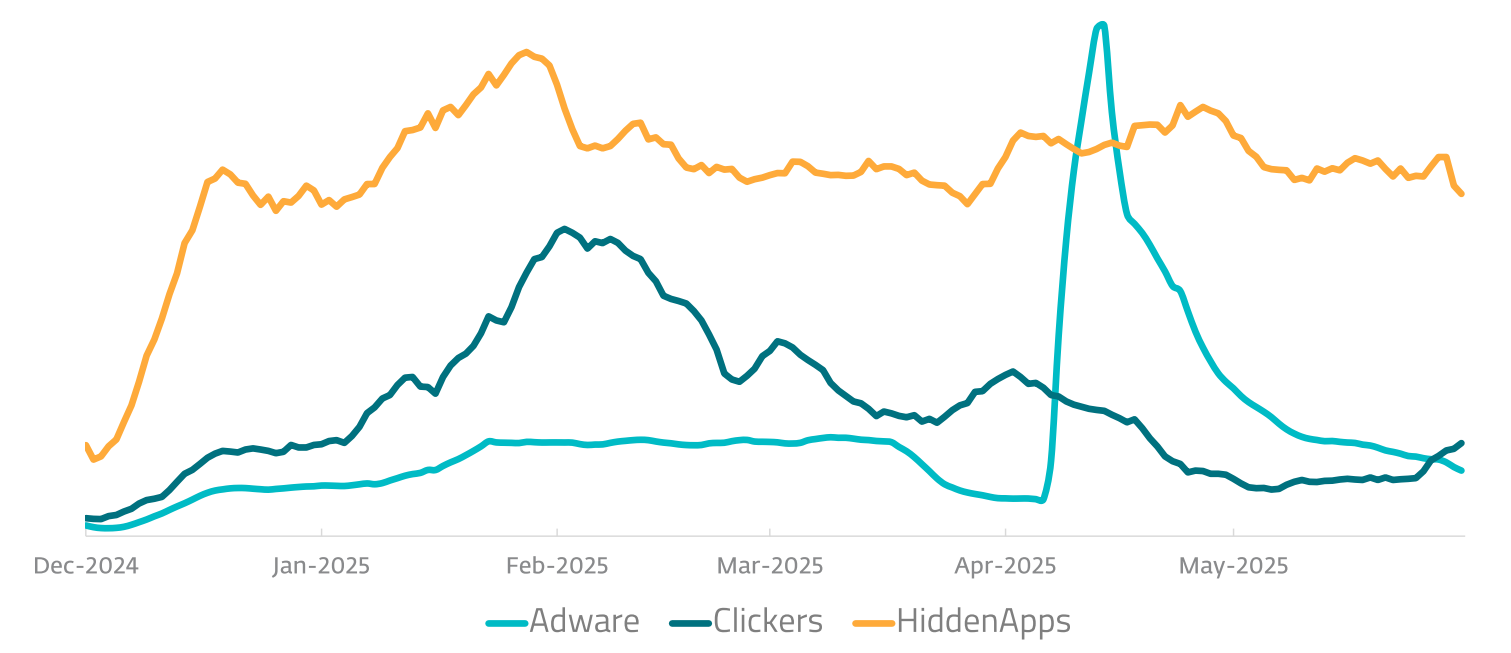
In this context, adware, which displays unwanted advertisements, might seem pretty innocuous. But in reality, it’s not something that should be dismissed, either. Adware detections surged by 160% in the first half of 2025, according to ESET’s latest threat report. Read on to learn more about how adware works, and how you can keep your Android device adware-free.
What is adware and how does it work?
Adware occupies something of a grey area in the threat landscape. At one end of the spectrum is legitimate free software that may come with ads which are hard to switch off. Annoying, but not malicious. Next come potentially unwanted applications/programs (PUAs/PUPs), which display intrusive ads and modify your device settings. A more harmful type of PUP/PUA may do this as well as other nefarious actions, such as stealing some personal data.
RELATED READING: Why your phone is slow – and how to speed it up
In general, “adware” refers to any unwanted or potentially malicious software that displays intrusive ads on your device without your consent. These could be pop-ups, in-browser ads, banner ads, push notifications, or even full-screen content, including videos. The end goal for the developer is usually to generate revenue by tricking you into installing the adware, and viewing or clicking on those ads.
In addition, these kinds of threats might also:
- track your online activity to personalize advertising
- harvest personal information to sell to third parties
- automatically click on ads without your knowledge in click fraud schemes (a category we call “Clickers”)
- hide itself after installation to prevent you removing it (what we call “Hidden Apps”)
- use up your data allowance
- slow down the performance of your device
- open the door to malware

How does it get on your device?
Adware developers have devised various ways to trick you into installing adware. These include:
- disguising it as a legitimate app
- bundling it with a piece of freeware
- exploiting vulnerabilities in your device software or OS via a drive-by-download
- tricking you into clicking on a misleading or malicious ad
- fake pop-ups (e.g., which falsely claim your device is compromised with malware)
- phishing links, either sent via email, text or social media messages
Evasion techniques
Adware developers also go to some lengths to evade detection by unsuspecting mobile users and security tools. As mentioned, they may hide the adware in “legitimate” free software, or disguise it as a legit app. They could also disguise it as a fake update for your phone.
The code itself may be encrypted to prevent basic AV tools from scanning and blocking it. Or it could be regularly updated using polymorphic techniques, which make it difficult for some tools to detect. Developers may even use anti-analysis techniques, which make it harder for security researchers to determine how their adware variant works.

Introducing Kaleidoscope
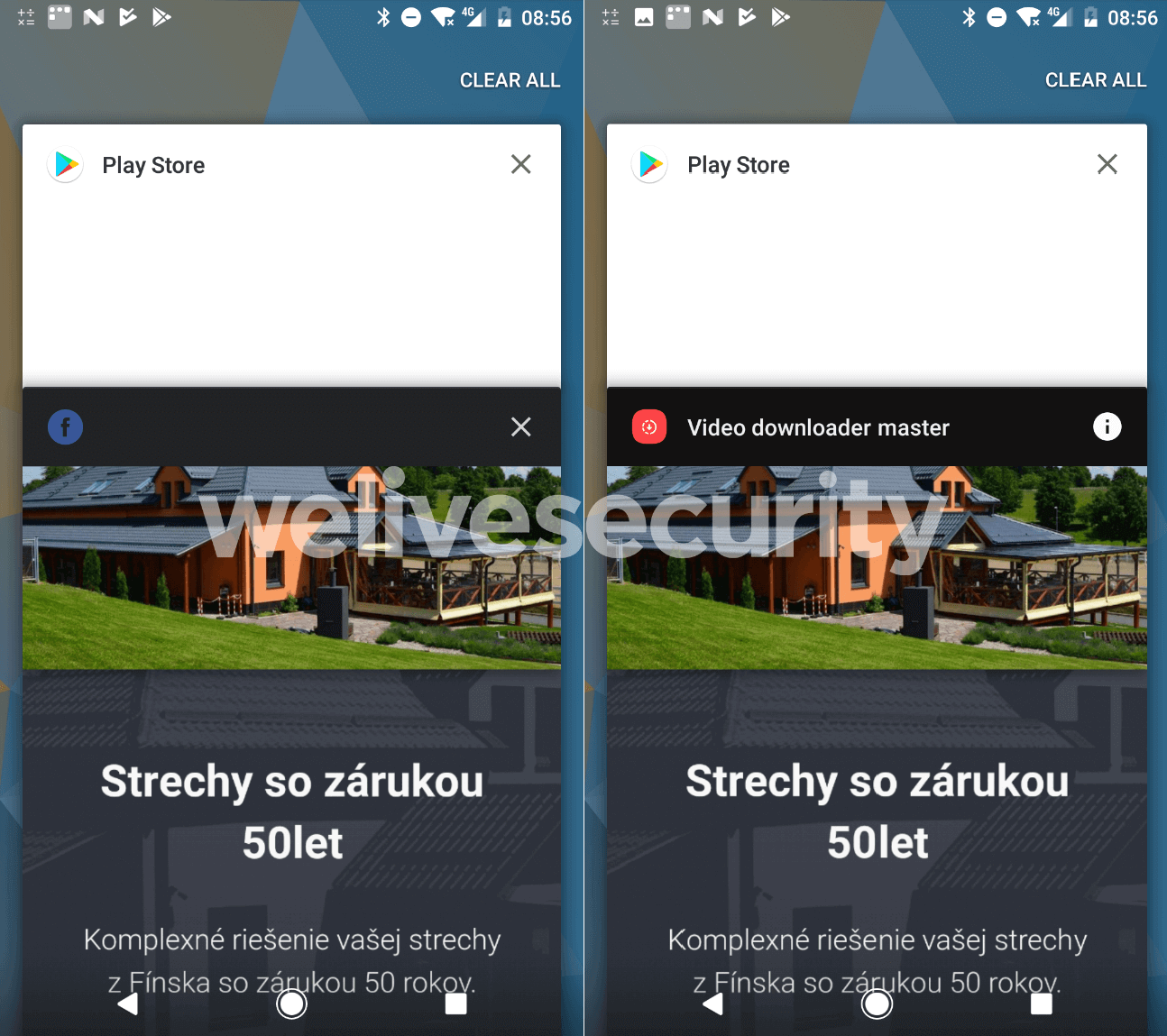
One particularly sophisticated adware variant discovered recently by ESET has been dubbed Kaleidoscope. This Android-based ad fraud campaign uses an “evil twin” tactic whereby its developers create two identical versions of the same app. One benign version is circulated on the official app store, while a malicious twin version is distributed on unofficial third-party stores. They use deceptive ads to direct victims to the latter.
Crucially, both versions have the same app name and unique identifier (app ID). This means that the fraudulent ad impressions generated by the “evil” version are judged by advertisers to be legitimate. It helps the developers to keep the revenue rolling in, while victims are bombarded by ads which slow down their device. The adware accounted for over a quarter (28%) of detections across the Android adware category in H1 2025.
Do I have adware on my device?
To find out if your Android device may be compromised, check for the following warning sigs:
- Slow performance and system crashes
- The appearance of new extensions and toolbars
- Web pages that don’t display properly
- Unwanted software on your device
- Excessive and intrusive ads
- Your browser homepage changing without your permission
- Rapid battery drain
- High and unexplained data usage
How to head off adware
Fortunately, there are various ways to mitigate the risks posed by adware. The most effective route is to prevent it from installing in the first place. Consider the following:
- Only download apps from reputable developers – always check their rating and reviews.
- Check app reviews before downloading.
- Always stick to the Google Play store, avoiding downloads from any third-party app stores where malware is more prevalent.
- Avoid clicking on ads or pop- ups, in case they are malicious.
- Apply regular updates to your OS and browser, to ensure there are no vulnerabilities that could be exploited to install adware on your device.
- Be alert to the threat of phishing: never click on links in unsolicited emails/texts/social messages.
- Install security software from a trusted vendor, keep it updated and, where applicable, make sure PUA detections are enabled.
If you think your device may have already been compromised with adware, disconnect your device from Wi-Fi and mobile data. Reboot it in Safe Mode (this will vary from device to device), then go to Settings > Apps and notifications > See all apps and uninstall anything that looks suspicious. It may also be necessary to clear your browser cache and cookies.
Alternatively, run a scan with reputable security software like ESET Mobile Security, which, as long as you follow the recommendation to enable PUA detections, will go a long way toward helping you steer clear of adware.