
Chances are good that many of us have had enough of passwords. In a world where we have to manage access for scores of online accounts, passwords no longer seem fit for purpose. Many of us reuse the same, easy-to-remember login credentials across these apps and websites and commit other password-related mistakes, which makes it easier for those with malicious intent to guess or steal our login details. And once one password is cracked, our entire digital world could come crashing down.
It’s actually somehow remarkable that passwords have lasted so long, with the reason largely boiling down to a lack of effective alternatives. But this may be about to change with the emergence of passkeys. Google recently announced support for the new technology on both personal and work accounts (not unlike Apple and Microsoft), so could a new era of passwordless logins be just around the corner?
Previous attempts to enhance or update the password experience and security have only had partial success. Two-factor authentication (2FA) does significantly help make passwords more secure, but its uptake has been far from universal as some people find the two-step process unwieldy. Also, one-time codes sent to users via text messages, which is by far the most commonly used variety of 2FA, can still be intercepted.
Password managers, for their part, do a great job of generating, storing and recalling a long, complex and unique password for each individual site. But they may not always cover all your devices, operating systems and web browsers and may present a single point of failure should you misplace your master password. In some cases, the user experience can also be a little clunky, too.
Enter passkeys, an industry standard that the biggest names in tech hope will one day replace passwords, 2FA and the need for password management as we know it.
How do passkeys work?
Passkeys harness the power of public key cryptography. A passkey consists of a pair of cryptographic keys – a private one and a corresponding public one – that is generated to secure your account on a website, app or another online service.
The private key is stored on your device as a long string of encrypted characters whereas the matching public key is uploaded to the servers of the corresponding online service, for example Google or even Apple’s iCloud keychain password management system.
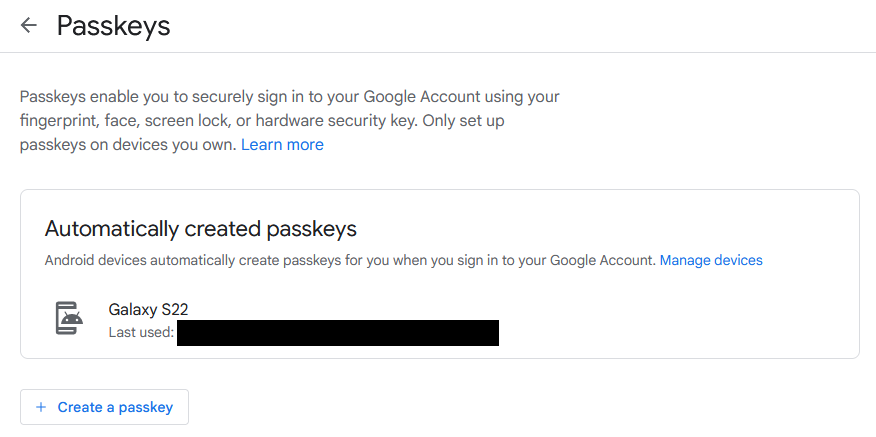
If you’re signed into your Google account from your smartphone, Google will have already generated a passkey for you
Then, when you attempt to log in, you’ll be asked to authenticate with your PIN, fingerprint or another device screen-lock mechanism. There’s no need to enter or remember any passwords, which immediately makes the process more secure and more seamless to use.
On the login attempt, the server sends a cryptographic challenge to your device, asking the private key to solve it and relay it back to the server. This response is used to verify that the public and private key pairs match as both are required to authenticate you.
At no point does the biometric data leave the device, nor does the server learn what the private key is. Indeed, you never actually see the private key yourself, either – all the magic happens in the background and with next to zero effort on your part.
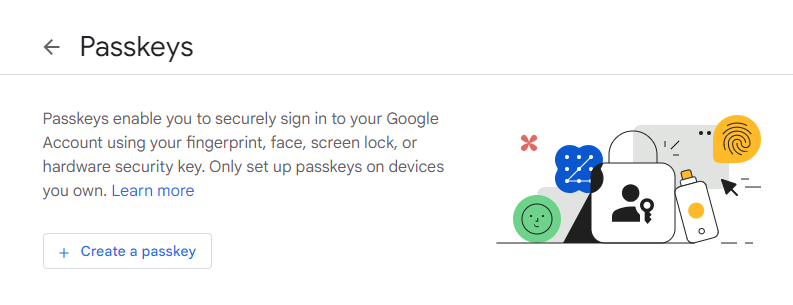
First step towards setting up passkey authentication in Google account security settings
What are the benefits of passkeys?
So, could passkeys offer the ‘Holy Grail’ of both ease of use and stronger security? Here are some of the benefits in more detail:
- Phishing- and social engineering-resistant: Passkeys do away with the problem of people accidentally spilling their login credentials to cybercriminals by entering them into phoney websites. Instead, you’re asked to use your device to prove that you are the account’s true owner.
- Prevent fallout from a third-party breach: If a website or app provider is breached, only public keys could be stolen – your private key is never shared with the online service, and there’s no way to figure it out from the public key. On its own, then, the public key is useless to an attacker. Compare this to the current system, where hackers can steal large troves of ready-to-use username/password combinations.
- Avoid brute-force attacks: Passkeys rely on public key cryptography, meaning attackers can’t guess them or use brute-force techniques to crack accounts open.
- No 2FA interception: There’s no second factor with passkeys, so users aren’t at risk of attack techniques designed to intercept SMS codes and the like. Indeed, think of a passkey itself as consisting of multiple authentication factors. In fact, passkeys are strong enough to replace even the most secure flavor of 2FA – hardware security keys.
- Built on industry standards: Passkeys are based on FIDO Alliance and W3C WebAuthn working group standards, meaning they should work across all participating operating systems, browsers, websites, apps and mobile ecosystems. Apple, Google and Microsoft are all supporting the technology, as are (or will soon be) major password management companies such as 1Password and Dashlane and platforms like WordPress, PayPal, eBay and Shopify.
- Easy to recover: Passkeys can be stored in the cloud and thus restored to a new device if it is lost.
- Nothing to remember: For users, there’s no longer a need to create, remember and protect large volumes of passwords.
- Works across multiple devices: Once created, a passkey can be used on new devices without the need to re-enrol each time as per regular biometric authentication. However, there are caveats, as detailed below.
Why might passkeys not be a good idea?
There may be some hurdles along the way that may ultimately stop you from adopting passkeys, for the time being, anyway: industry adoption and the way passkeys sync.
- Passkeys only sync to devices running the same OS: As this article explains, passkeys sync by OS platform. That means if you have an iOS device but also use Windows, for example, it could make for a frustrating user experience. You would need to scan QR codes and switch on Bluetooth to get your passkeys working across devices using different operating systems. That’s actually less user-friendly than the current experience for passwords.
- Adoption is far from industry-wide: Although some big names are already on board with passkeys, it’s still early days. Aside from the big platforms, it will also take some time before we reach a critical mass of websites and apps supporting it. Check out whether your favorite platforms support the technology here.
Could this be the beginning of the end for passwords? Passkeys are the strongest contender yet. But to gain near-universal acceptance among users, the tech vendors may need to make it easier still to use them across different OS ecosystems.
If you’re ready to give passkeys a try, it takes very little effort to get started via the settings menu of your Google, Apple or Microsoft account(s).