
Email has been with us for decades. And while social media and mobile messaging apps are increasingly popular, it remains the mainstay of our personal and professional communications. There are an estimated 4.1 billion email users globally today, with 306 billion emails sent and received every day last year. We use it for everything from sending pictures and keeping up with friends, to interacting with essential healthcare, banking, government and other services.
Yet email is also a honeypot for malicious activity. By hijacking our accounts, hackers can monetize attacks in a variety of ways to line their own pockets. For the victim, it can be a stressful and bewildering experience.
In this article, we look at:
- how to check if you have been hacked
- how to recover your email account
- what you can do to avoid falling victim again.
Why would someone want to hack my email?
Cybercrime costs the world trillions annually. A great deal of this revenue comes from monetizing stolen data, which many of us don’t realize is often stored in our email accounts. We might have sent bank statements to our accountant. Rental agreements containing contact details. Or highly sensitive data to our lawyer.
This information could be harvested by an attacker and used against us, to elicit more information, in phishing attacks, or leveraged directly to carry out identity fraud. Some 49 million Americans lost a total of around $56bn to identity scammers last year.
Cybercriminals might also want to get your email account and log-ins in order to:
- Carry out credential stuffing. They’re betting that you will use the same log-ins on other accounts, and so use automated software to try and open them too
- Reset your other accounts. Most websites email a reset link to click on, which an account hijacker will be able to access and use to change passwords on your other accounts
- Send spam/phishing/malicious emails to all of your contacts
There are a few ways hackers could get your account details. They could send a phishing email directly, tricking you into believing it came from a legitimate source – potentially even your email provider – and requesting you “log in” again. Alternatively, they might also be able to:
- Guess or brute force your email password using automated software
- Steal your email and log-in combination from a company you’ve registered with in the past. Although the password may be encrypted, the algorithm can sometimes be cracked
- Steal your password if you’ve been logging in on public Wi-Fi or a shared computer
- Steal your details via malware downloaded to your machine (usually via a phishing email)
How can I check if my account was hijacked?
The first step towards recovering your account is finding out what happened. Some common signs that your email has been hacked include:
- Emails in your sent and inbox that you don’t recognize
- The password has been changed, locking you out
- Friends complaining of spam coming from your email address
- Receiving multiple password change requests from other websites and apps
- Your email provider notifies of multiple logins from unfamiliar IPs and locations
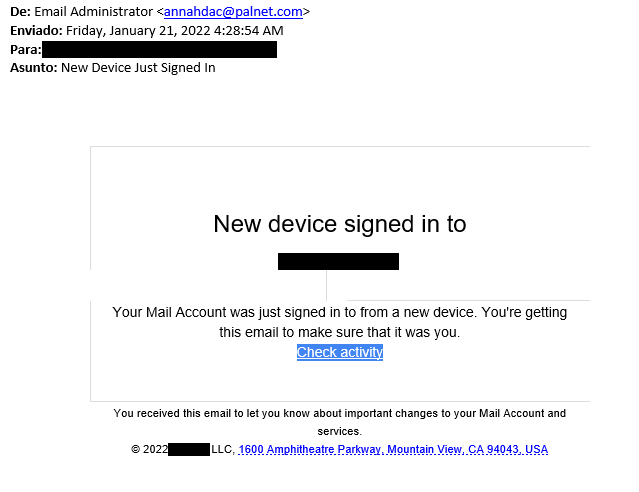
If you want to double check, try HaveIBeenPwned.com, which runs an extensive database of breached email and mobile phone accounts you can check against.
Additionally, Google, for example, enables you to review your recent account activity or perform a “Security Checkup”, which includes recent activity such as new sign-ins. Other major email services provide similar options, as well as offer step-by-step guidance for recovering a compromised account (Gmail, Yahoo Mail and Outlook.com).
How do I stop my email account from being hacked again?
Going through the experience of having an email account hijacked reminds us all just how much we use these apps every day. The good news is there are plenty of things you can do proactively today to prevent the same thing happening again. These include:
- Change your email passwords and any others you’ve reused on other sites
- Switch on multi-factor authentication (MFA), which will mitigate the risk of password theft
- Run a full computer scan to ensure there’s no malware on it
- Don’t fill any personal or log-in info online if you receive an unsolicited request to do so (via email, text, social media etc)
- Don’t log-in to email on public Wi-Fi or a shared computer
Following a serious incident, it might also be useful to reach out to your main contacts (using blind carbon copy aka BCC), or even via social media. If you’re concerned, also inform your bank. At any rate, stay calm and learn from the experience.